 Skip to content

Introduction to Tivimate IPTV Player
What is Tivimate and Why is it Popular in Switzerland?
The Tivimate IPTV Player has rapidly gained popularity among streaming enthusiasts in Switzerland, and for good reason. This powerful application is designed to provide users with a seamless viewing experience, allowing them to access a wide range of IPTV channels from various providers. With its user-friendly interface and robust features, Tivimate stands out as one of the best IPTV players for Android.

Tivimate is particularly favored for its ability to support multiple playlists, making it an ideal choice for users who subscribe to various IPTV services. This flexibility allows viewers to customize their viewing experience, ensuring they have access to their favorite channels without hassle. Moreover, the app is compatible with a variety of devices, including Android TV, Firestick, and smartphones, making it accessible to a broad audience.
Overview of Tivimate’s Purpose and Features
At its core, the Tivimate IPTV Player is designed to enhance the way users consume television content. It offers a plethora of features that cater to both casual viewers and avid binge-watchers. Here are some of the standout features that contribute to its popularity:
- Multi-Playlist Support: Users can easily add and manage multiple IPTV playlists, allowing for a diverse selection of channels.
- Electronic Program Guide (EPG): Tivimate provides an integrated EPG, enabling users to view program schedules and set reminders for their favorite shows.
- Catch-Up TV: This feature allows users to watch previously aired content, ensuring they never miss out on their favorite programs.
- Customizable User Interface: Tivimate offers a sleek and intuitive interface that can be tailored to individual preferences, enhancing the overall user experience.
- Recording Capabilities: Users can record live TV, making it easy to save content for later viewing.
These features not only make Tivimate a perfect IPTV solution for many users but also position it as a strong competitor against other IPTV players available in the market.
For those interested in exploring Tivimate further, you can find a comprehensive list of compatible IPTV services on our IPTV list page. Additionally, if you’re looking for installation guidance, our installation guide provides step-by-step instructions to get you started.
In conclusion, the Tivimate IPTV Player is a versatile and feature-rich application that caters to the needs of IPTV users in Switzerland. Its combination of user-friendly design and powerful functionalities makes it a top choice for anyone looking to enhance their streaming experience. For more information on subscription options and pricing, visit our plans page or contact us via WhatsApp at this link.
How to Download and Install Tivimate in Switzerland
Step-by-Step Guide to Downloading Tivimate APK
Downloading and installing the Tivimate IPTV Player in Switzerland is a straightforward process that can be completed in just a few steps. This guide will walk you through the necessary actions to get Tivimate up and running on your device, ensuring you can enjoy a seamless streaming experience.
- Enable Unknown Sources: Before downloading the Tivimate APK, you need to allow installations from unknown sources. Go to your device’s Settings > Security > Unknown Sources and toggle it on.
- Download the Tivimate APK: Visit a trusted source to download the Tivimate APK. You can find the latest version on the official website or reputable APK repositories. Ensure you are downloading the correct version for your device.
- Install the APK: Once the download is complete, navigate to your device’s Downloads folder. Tap on the Tivimate APK file to begin the installation process. Follow the on-screen prompts to complete the installation.
- Open Tivimate: After installation, locate the Tivimate app on your device and open it. You will be greeted with a user-friendly interface that guides you through the initial setup.
- Add IPTV Playlists: To start watching your favorite channels, you will need to add your IPTV playlists. This can be done by entering the URL of your playlist or uploading a file directly.
By following these steps, you can easily download and install the Tivimate IPTV Player on your device, allowing you to access a wide range of channels and content.
Device Compatibility and Installation Tips
The Tivimate IPTV Player is compatible with various devices, making it a versatile choice for users in Switzerland. Here’s a breakdown of the devices that support Tivimate:
- Android Smartphones and Tablets: Tivimate works seamlessly on most Android devices, providing a mobile solution for streaming.
- Android TV Boxes: For a more robust viewing experience, Tivimate is optimized for Android TV boxes, allowing for larger screen viewing.
- Amazon Fire TV Stick: Users can also install Tivimate on Fire TV Stick, making it a popular choice for those who prefer streaming on their television.
- Smart TVs: If your smart TV runs on Android, you can download Tivimate directly from the app store.
Installation Tips:
- Ensure your device has sufficient storage space before downloading the APK.
- Keep your device’s software updated to avoid compatibility issues.
- If you encounter any problems during installation, refer to our installation guide for troubleshooting tips.
In summary, downloading and installing the Tivimate IPTV Player is a simple process that opens up a world of entertainment options. With its compatibility across various devices, Tivimate stands out as one of the best IPTV players for Android users in Switzerland. For more information on compatible IPTV services, check out our IPTV list page. If you have any questions or need assistance, feel free to contact us via WhatsApp at this link.
By following these guidelines, you can ensure a smooth installation process and start enjoying your favorite IPTV channels in no time!
Setting Up Tivimate with Local IPTV Providers
How to Add IPTV Playlists in Tivimate
Setting up the Tivimate IPTV Player to work with local IPTV providers in Switzerland is a crucial step for users looking to access their favorite channels. Adding IPTV playlists is straightforward, and this guide will walk you through the process step-by-step.
- Open Tivimate: Launch the Tivimate app on your device. If you have just installed it, you will be greeted with a welcome screen.
- Select ‘Add Playlist’: On the main screen, you will see an option to add a playlist. Click on this option to begin the process.
- Choose Playlist Type: Tivimate supports various playlist formats, including M3U and XSPF. Most IPTV providers will offer their playlists in M3U format, which is widely compatible.
- Enter Playlist URL or File:
- If you have a URL for your IPTV playlist, select the option to add via URL. Enter the URL provided by your IPTV service.
- Alternatively, if you have a playlist file, you can upload it directly from your device.
- Name Your Playlist: After entering the URL or uploading the file, you will be prompted to name your playlist. Choose a name that helps you easily identify it later.
- Save and Load the Playlist: Once you have named your playlist, save it. Tivimate will then load the channels from the playlist, and you will be able to access them from the main menu.
- Repeat for Additional Playlists: If you subscribe to multiple IPTV services, you can repeat the process to add additional playlists, allowing you to switch between them effortlessly.
By following these steps, you can easily add IPTV playlists to the Tivimate IPTV Player, ensuring you have access to a wide range of channels tailored to your preferences.
Configuring EPG for Swiss Channels
The Electronic Program Guide (EPG) is an essential feature of the Tivimate IPTV Player, providing users with a comprehensive overview of current and upcoming programming. Configuring the EPG for Swiss channels enhances your viewing experience by allowing you to see what’s on and plan your viewing accordingly. Here’s how to set it up:
- Access EPG Settings: In the Tivimate app, navigate to the settings menu. Look for the option labeled “EPG” or “Electronic Program Guide.”
- Add EPG Source: You will need to add an EPG source that corresponds to your IPTV playlist. This is typically provided by your IPTV service. If your provider offers an EPG URL, select the option to add via URL.
- Enter EPG URL: Input the EPG URL provided by your IPTV service. This URL will allow Tivimate to fetch the program guide data for the channels in your playlist.
- Select EPG Language: Choose the language for the EPG. For Swiss users, options may include German, French, or Italian, depending on your preference.
- Save Settings: After entering the EPG URL and selecting your language, save the settings. Tivimate will now begin to download the EPG data, which may take a few moments.
- View EPG: Once the EPG data is loaded, you can access it from the main menu. The EPG will display current shows, upcoming programs, and additional details such as show descriptions and durations.
By configuring the EPG, you can enhance your viewing experience with the Tivimate IPTV Player, making it easier to keep track of your favorite shows and channels.
In conclusion, setting up the Tivimate IPTV Player with local IPTV providers in Switzerland is a simple yet effective way to access a diverse range of channels. By adding playlists and configuring the EPG, you can tailor your viewing experience to suit your preferences. For more information on compatible IPTV services, visit our IPTV list page. If you need assistance or have questions, feel free to reach out via WhatsApp at this link.
With these steps, you are well on your way to enjoying a seamless IPTV experience with Tivimate!
Key Features and Benefits of Tivimate
Multi-Playlist Support and Customization Options
The Tivimate IPTV Player is renowned for its robust features that cater to the diverse needs of IPTV users, particularly in Switzerland. One of its standout capabilities is multi-playlist support, which allows users to manage and switch between multiple IPTV playlists effortlessly. This feature is particularly beneficial for those who subscribe to various IPTV services, enabling them to access a wide array of channels without the hassle of constantly changing applications.
- Easy Playlist Management: Users can add, edit, and delete playlists directly within the app. This flexibility ensures that you can curate your viewing experience according to your preferences.
- Customizable User Interface: Tivimate offers a sleek and intuitive interface that can be tailored to individual tastes. Users can adjust themes, layouts, and even the order of channels, making it a highly personalized experience.
- User Profiles: For families or shared devices, Tivimate allows the creation of multiple user profiles. Each profile can have its own playlists and settings, ensuring that everyone can enjoy their favorite content without interference.
This level of customization not only enhances user satisfaction but also positions Tivimate as one of the best IPTV players for Android available today.
Recording, Catch-Up TV, and User Interface Overview
Another significant advantage of the Tivimate IPTV Player is its advanced features that enhance the viewing experience. Among these are recording capabilities and catch-up TV, which are essential for modern viewers who want flexibility in their viewing habits.
- Recording Capabilities: Tivimate allows users to record live TV shows and movies directly within the app. This feature is invaluable for those who may not be able to watch a show live. Users can set recordings for specific times or series, ensuring they never miss an episode.
- Catch-Up TV: This feature enables users to watch previously aired content, allowing them to catch up on missed shows at their convenience. This is particularly useful for busy individuals who may not have time to watch live broadcasts.
- User Interface Overview: The user interface of Tivimate is designed with simplicity and functionality in mind. The main menu is easy to navigate, with clear categories for live TV, recordings, and settings. The EPG (Electronic Program Guide) is seamlessly integrated, providing users with a comprehensive view of current and upcoming programming.
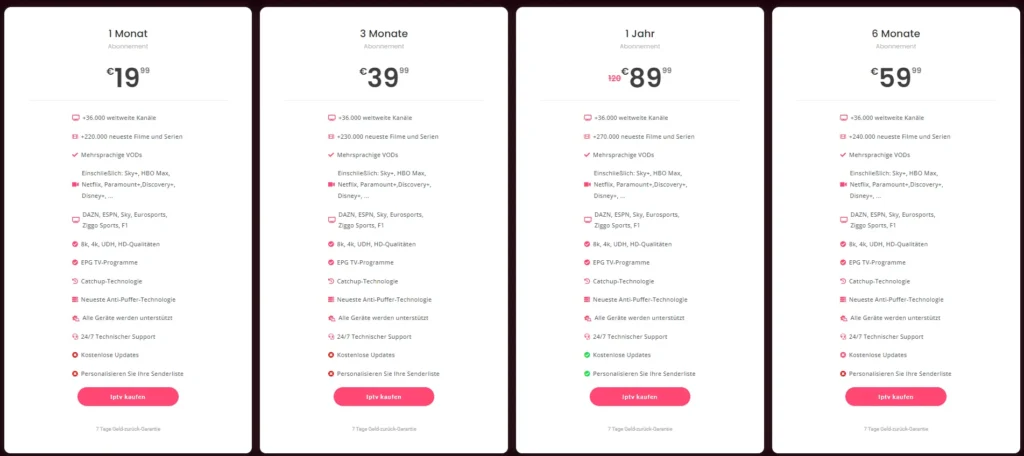
In addition to these features, Tivimate is continually updated to improve performance and add new functionalities. Users can easily check for updates within the app, ensuring they always have access to the latest features and enhancements.
For those interested in exploring Tivimate further, you can find a comprehensive list of compatible IPTV services on our IPTV list page. If you’re looking for installation guidance, our installation guide provides step-by-step instructions to get you started.
In conclusion, the Tivimate IPTV Player offers a wealth of features that cater to the needs of IPTV users in Switzerland. Its multi-playlist support, customizable options, and advanced functionalities like recording and catch-up TV make it a top choice for anyone looking to enhance their streaming experience. For more information on subscription options and pricing, visit our plans page or contact us via WhatsApp at this link.
With Tivimate, you can enjoy a tailored and flexible viewing experience that meets all your entertainment needs!
Troubleshooting and FAQs
Common Issues and Their Solutions
While the Tivimate IPTV Player is designed to provide a seamless streaming experience, users may occasionally encounter issues. Here are some common problems and their solutions to help you troubleshoot effectively:
- Buffering Issues:
- Cause: This is often due to slow internet speeds or network congestion.
- Solution: Ensure your internet connection is stable. You can also try lowering the video quality in the settings or using a wired connection for better stability.
- Playlist Not Loading:
- Cause: This may occur if the playlist URL is incorrect or the server is down.
- Solution: Double-check the URL for any typos. If the URL is correct, try accessing it from a web browser to see if it’s working.
- EPG Not Displaying:
- Cause: The EPG may not load if the source URL is incorrect or if there are connectivity issues.
- Solution: Verify the EPG URL provided by your IPTV service. Ensure that your device is connected to the internet.
- App Crashing or Freezing:
- Cause: This can happen due to outdated software or insufficient device resources.
- Solution: Make sure you are using the latest version of Tivimate. Clear the app cache or reinstall the app if the problem persists.
- Audio/Video Sync Issues:
- Cause: This can occur due to network lag or device performance.
- Solution: Restart the app and check your internet connection. If the issue continues, try adjusting the audio delay settings in the app.
By following these troubleshooting tips, you can resolve common issues with the Tivimate IPTV Player and enjoy uninterrupted streaming.
Frequently Asked Questions about Tivimate
As users explore the Tivimate IPTV Player, several questions frequently arise. Here are some of the most common inquiries along with their answers:
- Is Tivimate IPTV Player free to use in Switzerland?
Tivimate offers a free version with limited features. For full access, including advanced functionalities like recording and multi-playlist support, users need to purchase a subscription. - How can I add my IPTV playlist in Tivimate?
You can add your IPTV playlist by selecting the ‘Add Playlist’ option in the app, entering the URL provided by your IPTV service, or uploading a file directly. - Is Tivimate compatible with Swiss IPTV providers?
Yes, Tivimate is compatible with many local IPTV providers in Switzerland. Ensure that your provider offers a compatible playlist format. - Does Tivimate support EPG for Swiss channels?
Yes, Tivimate supports EPG for Swiss channels, allowing users to view program schedules and set reminders for their favorite shows. - Can I use Tivimate on Android TV or Firestick?
Absolutely! Tivimate is optimized for Android devices, including Android TV and Firestick, providing a great viewing experience on larger screens. - How to fix buffering or playback issues in Tivimate?
Check your internet connection, lower the video quality in the settings, and ensure that your device is not overloaded with background applications. - Are there any legal concerns using Tivimate in Switzerland?
Users should ensure they are using Tivimate with legitimate IPTV services that comply with local copyright laws to avoid any legal issues. - What are the best settings for Tivimate in Switzerland?
Optimal settings may vary based on your internet speed and device capabilities. Generally, using a stable connection and adjusting video quality settings can enhance performance. - How does Tivimate compare to other IPTV players?
Tivimate is often praised for its user-friendly interface, multi-playlist support, and advanced features, making it a strong competitor among the best IPTV players for Android.
For more detailed information and assistance, feel free to visit our FAQ page or contact us via WhatsApp at this link.
In conclusion, the Tivimate IPTV Player is a powerful tool for accessing a wide range of IPTV channels. By understanding common issues and having answers to frequently asked questions, users can maximize their experience and enjoy seamless streaming. For further resources, check out our installation guide and explore our IPTV list page for compatible services.
With Tivimate, you can enjoy a tailored and flexible viewing experience that meets all your entertainment needs!
Comparing Tivimate with Other IPTV Players
Objective Comparison with Best IPTV Players for Android
When it comes to choosing an IPTV player, the Tivimate IPTV Player stands out among its competitors, particularly for users in Switzerland. To help you make an informed decision, we will compare Tivimate with some of the best IPTV players for Android available today. This comparison will focus on key features, user experience, and overall performance.
| Feature | Tivimate IPTV Player | Competitor A | Competitor B |
|---|---|---|---|
| Multi-Playlist Support | Yes | No | Yes |
| EPG Integration | Yes | Limited | Yes |
| Recording Capability | Yes | No | Yes |
| User Interface | Highly Customizable | Basic | Moderate |
| Catch-Up TV | Yes | No | Yes |
| Device Compatibility | Android, Firestick | Android Only | Android, iOS |
| Subscription Cost | Affordable | Higher | Moderate |
From the table above, it is clear that Tivimate excels in several areas, particularly in multi-playlist support and recording capabilities. Unlike some competitors, Tivimate allows users to manage multiple playlists seamlessly, making it a versatile choice for those who subscribe to various IPTV services. Additionally, the integrated EPG feature enhances the viewing experience by providing users with program schedules and reminders.
User Ratings and Feedback on Tivimate vs. Competitors
User feedback plays a crucial role in determining the effectiveness of an IPTV player. Tivimate has received positive reviews from users for its intuitive interface and robust features. Here are some insights from user ratings:
- Tivimate: Users appreciate the app’s customizability and ease of use. Many highlight the ability to record live TV and access catch-up features as significant advantages. The overall rating averages around 4.8 out of 5 stars on various platforms.
- Competitor A: While it offers basic functionality, users often mention the lack of advanced features like recording and multi-playlist support, leading to an average rating of 3.5 out of 5 stars.
- Competitor B: This player is well-regarded for its user interface but lacks some of the advanced features that Tivimate offers, resulting in an average rating of 4.0 out of 5 stars.
In summary, the Tivimate IPTV Player not only provides a comprehensive set of features but also garners high user satisfaction ratings, making it a top choice for IPTV users in Switzerland. For those looking to explore Tivimate further, you can find a comprehensive list of compatible IPTV services on our IPTV list page. If you’re looking for installation guidance, our installation guide provides step-by-step instructions to get you started.
In conclusion, when comparing Tivimate with other IPTV players, it is evident that Tivimate offers superior functionality, user experience, and value for money. For more information on subscription options and pricing, visit our plans page or contact us via WhatsApp at this link.
With Tivimate, you can enjoy a tailored and flexible viewing experience that meets all your entertainment needs!
Conclusion: Experience the Best with Tivimate IPTV Player
In summary, the Tivimate IPTV Player is an exceptional choice for streaming enthusiasts in Switzerland, offering a wealth of features that enhance your viewing experience. With its multi-playlist support, you can easily manage various IPTV subscriptions, ensuring you have access to all your favorite channels in one place. The user-friendly interface, combined with powerful functionalities like recording capabilities and catch-up TV, makes Tivimate stand out among the best IPTV players available.
Key benefits of using Tivimate include:
- 24/7 Customer Support: Our dedicated team is always ready to assist you with any questions or issues you may encounter.
- Comprehensive Setup Guides: We provide detailed instructions to help you get started quickly and easily, ensuring a smooth installation process.
- Up-to-Date IPTV Content: Enjoy a wide range of channels and programming, tailored to your preferences and needs.
If you’re ready to elevate your streaming experience with the Tivimate IPTV Player, we invite you to explore our subscription options and pricing on our plans page. Should you have any questions or need assistance, feel free to reach out to us via WhatsApp at this link.
Join the Tivimate community today and discover the ultimate IPTV experience tailored just for you! 🌟
